

How I Designed a Feed Feature to Achieve a 40% Increase in Daily Active Users and Foster Collaboration
What if a single feature could fix a pain point for both users and clients, boosting daily engagement by 40% while transforming how they connect, collaborate, and learn?
Imagine a platform where learning goes beyond the classroom — where collaboration, networking, and sharing ideas fuel growth and connection. At Miles in the Sky, I embraced the challenge of designing the game-changing "Feed" feature: a dynamic space for users to exchange insights, ask questions, and build meaningful connections. Grounded in real feedback from former students and client companies, this feature not only solved pressing engagement challenges but also delivered tangible value to users and businesses alike. Dive in to discover how this innovation transformed the learning experience.
Role
Product Designer
Tools
Figma | Slack | Miro | OBS Software | Notion | Hotjar
1. Problem
Former students reported feeling disconnected from their peers. They expressed a desire for a platform that facilitated ongoing collaboration, knowledge sharing, and networking opportunities. The existing chat feature was not sufficient for these needs. Additionally, there was a need for a dedicated space for announcements from community managers. Previously, these announcements were shared in a chat channel, which had limitations and made it difficult for students to find and engage with important topics. The absence of a centralized Feed feature limited user engagement and diminished the community aspect of the platform.
From a B2B perspective, client companies emphasized the importance of increasing engagement in the platform. The Feed was seen as a way to:
1. Encourage connections between employees, especially in large organizations with geographically dispersed teams.
2. Foster discussions about course content to ensure employees apply learning in their daily work, reinforcing practical outcomes.
3. Create opportunities for employees to collaborate, build relationships, and share knowledge, which benefits both individual development and the company’s culture.
Without a centralized Feed, these objectives were harder to achieve, limiting the overall value of the platform for client companies and users.
2. Goals and Objectives
-
Improve User Engagement: Increase user interaction and content sharing within the platform.
-
Facilitate Networking: Create a space where users can connect and collaborate with peers and mentors.
-
Improve Knowledge Sharing: Allow users to ask questions and share resources related to their projects.
-
Centralize Announcements: Provide a dedicated area for community managers to share important updates and announcements, ensuring better visibility and engagement.
-
Support Client Companies’ Goals: Help client companies foster collaboration and engagement among their employees, improve learning retention, and promote the application of knowledge in real-world work scenarios.
3. Research
To inform the design of the Feed feature, I conducted the following research:
-
User Interviews: Engaged with former students to gather insights on their experiences and needs.
-
Client Feedback: Conducted interviews with client companies to understand their goals for employee engagement and learning outcomes.
-
Competitive Analysis: Analyzed similar platforms to identify best practices in community engagement and networking features.
4. Key Findings
-
Users wanted a simple, intuitive interface for sharing information and engaging with others.
-
The ability to filter posts from users that the user follows was crucial for easy navigation and increased engagement.
-
Notifications for interactions (likes, comments) were essential to keep users engaged.
-
Users expressed a desire for a space to gather people to discuss specific topics related to the course, but not limited to course content.
-
Client companies highlighted the need for features that promote networking among employees and discussions about applying learning, especially in dispersed teams.
5. Design Process
The creation of the 'Feed' feature was a journey of aligning user and business needs with technical possibilities, resulting in a design that drives engagement and connection. Constraints are an integral part of the process.
The design process began with crafting detailed user personas to represent the audience’s needs and goals. Next, user stories captured real-world scenarios and motivations, ensuring the design addressed practical challenges. User flows were mapped to visualize key interactions and identify potential pain points, setting the stage for a user-centric solution.
Low-fidelity wireframes laid the groundwork, showcasing early ideas like a search bar for navigating content. However, due to technical limitations, this feature had to be replaced with filter options—allowing users to sort posts by "newest," "more comments," and "more likes" for intuitive navigation. Despite this shift, the design maintained its focus on usability and efficiency.
High-fidelity mockups, developed using Figma and Design System components, refined the visual and functional elements. An interactive prototype followed, enabling hands-on testing to gather valuable feedback. Through usability testing with students, the design evolved, prioritizing navigation ease and interaction quality. Every step of this process overcame challenges to create a feature that resonates with users and drives engagement.
6. Final Design
The final design of the Feed feature includes:
-
Post Creation Interface: A simple form for users to create posts, with options to categorize content (e.g., questions, tools, insights, announcements).
-
Dynamic Feed Layout: A clean, scrollable feed displaying posts, comments, and likes in a visually engaging manner.
-
Announcement Section: A dedicated space for community managers to post important updates and announcements, ensuring easy access for users.
-
Notification System: Real-time notifications to keep users informed about interactions with their posts.
-
Filter Options: Due to technical limitations, we were unable to include a search bar in the Feed. However, users can filter posts by "newest," "more comments," and "more likes," helping them to easily navigate content.
-
Tabs for Community and Following: Users can switch between "Community" and "Following" tabs, allowing them to view posts from the entire community or only from users they follow, enhancing navigation and engagement.
-
Rooms: Users can create groups focused on specific topics, allowing them to gather others with similar interests. For example, a room could be dedicated to studying a particular programming language, fostering collaboration and deeper discussions.
7. Impact and Results
Post-launch analytics showed a significant increase in user engagement:
-
Increased Activity: 40% increase in daily active users on the platform.
-
Content Sharing: Users shared 150% more posts in the first month compared to previous engagement metrics.
-
Positive Feedback: users and client companies satisfaction ratings improved, with specific appreciation for the ability to centralize announcements, foster networking, and encourage practical learning discussions.
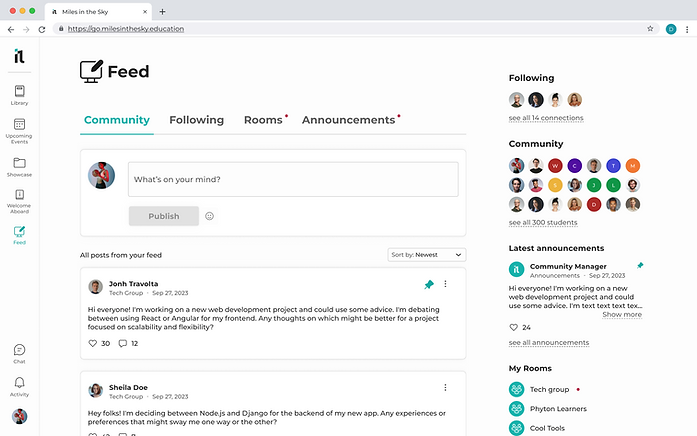
Image 1: Final version of the tab "Community" on Feed Feature.
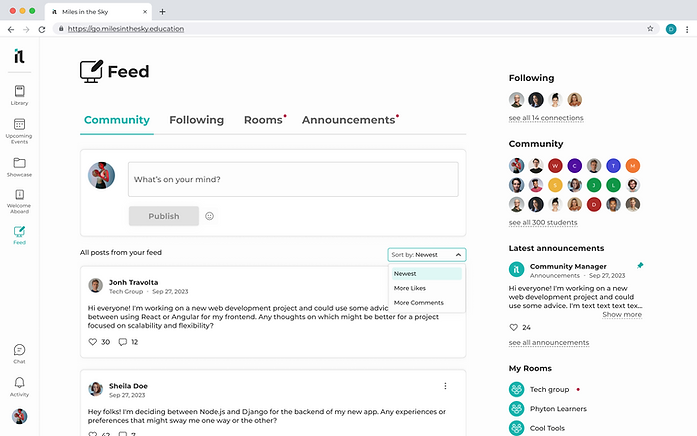
Image 2: showing how users can filter the posts

Image 3: Active notification on Dashboard about a invitation to join a Room.

Image 1: Final version of the tab "Rooms".